
Discord Profile Embed: Add a Live Discord Card to Any Website or README
Embed a live Discord profile card on your website, GitHub README, or forum signature. Just append .png to any discord.dog URL.
What Is a Discord Profile Embed?
A Discord profile embed is an image card that shows your Discord profile information — avatar, username, status, Spotify activity, badges, and more — in a format that can be placed anywhere images are accepted. It's a single image URL that renders a styled card based on live Discord data.
Think of it like GitHub's profile stats cards, but for Discord. You add one line to your README:
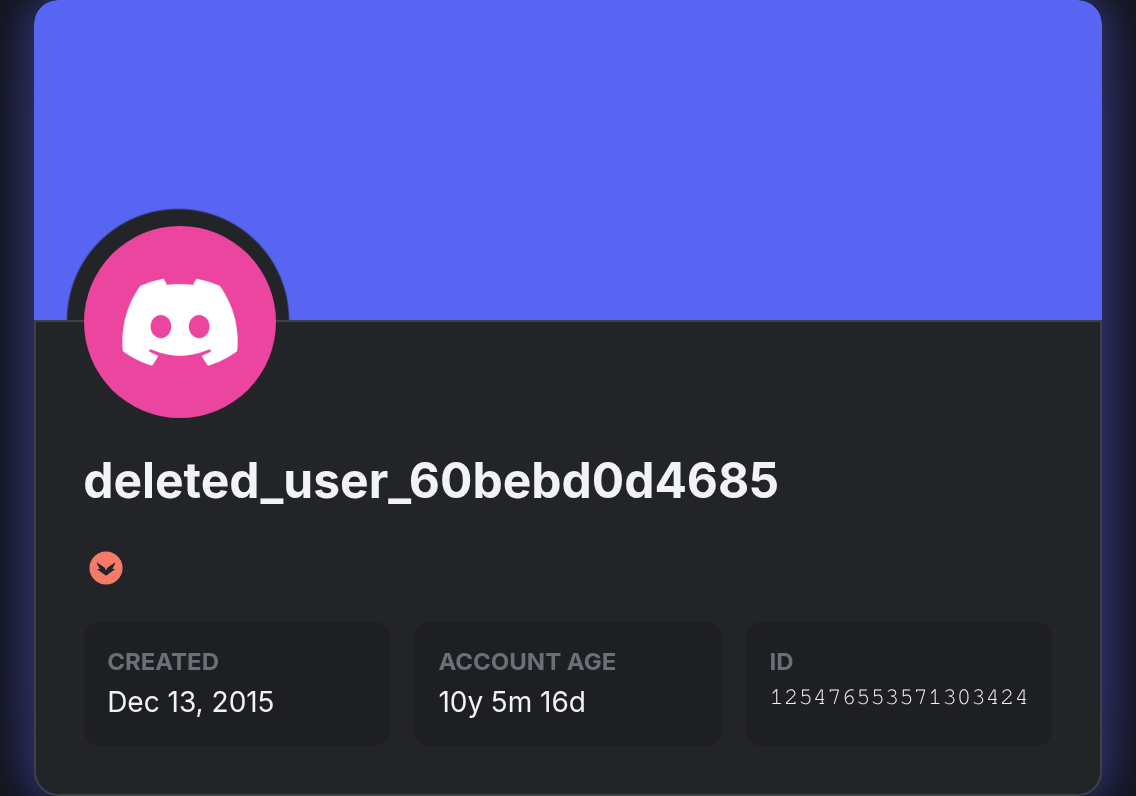
And visitors see a rendered card showing your current Discord status, what you're listening to on Spotify, your Nitro badge, your custom status — everything.
The basic version is simple: append .png to any discord.dog profile URL. The advanced version uses the embed builder for full customization.
How to Create Your Discord Embed
The Simple Method: Append .png
Every discord.dog profile URL becomes an image URL by adding .png:
https://discord.dog/125476553571303424.png
https://discord.dog/yourusername.png
https://discord.dog/yourcustomslug.png
That's the entire basic setup. This image URL:
- Returns a PNG card rendered from current profile data
- Updates on each request (no stale cache for long periods)
- Works anywhere an image URL is accepted
- Requires no API key or authentication
Query Parameters for Quick Customization
You can pass basic parameters directly in the URL without the embed builder:
https://discord.dog/125476553571303424.png?theme=dark&font=roboto
Common parameters:
| Parameter | Options | Description |
|---|---|---|
theme |
dark, light |
Base color scheme |
font |
roboto, poppins, rubik, open-sans, uni-sans |
Font family |
type |
discord, spotify, custom |
Card layout template |
display |
all, minimal, badges_only |
How much data to show |
width |
300–800 (px) |
Card width |
Try it now → Generate your embed card at discord.dog — just visit your profile and use the embed URL shown on the page.
Customizing Your Embed
Beyond the basic URL parameters, discord.dog provides granular control over every visual aspect of the card.
Color Options
Every color in the card can be individually customized:
- Background — the card's main background color
- Background 2 — used for gradients and secondary elements
- Text — primary text color (username, song title)
- Role — the color used for the username, derived from Discord role color by default
- Progress bar start / end — the Spotify progress bar gradient colors
All colors accept hex values (#1a1a2e, #7289da, etc.).
Typography
Five font families are available:
- Roboto — clean, neutral, Google's standard
- Poppins — slightly rounded, modern
- Rubik — geometric, slightly playful
- Open Sans — humanist, highly readable
- Uni Sans — bold, strong contrast
Layout Control
- Edge roundness — slider from sharp corners to fully rounded pill shape
- Gradient opacity — how strongly the background gradient applies
- Width — overall card width in pixels
- Display data —
all(everything),minimal(name + status only),badges_only
Element Toggles
Show or hide individual sections:
- Badges
- Custom status
- Spotify card
- Game activity
- Connections strip
- Account age
The Embed Builder
The embed builder at discord.dog/embed is a full visual editor. On the left: all the configuration controls. On the right: a live preview that updates as you adjust settings.
The workflow:
- Enter your Discord user ID or username
- The builder loads your current profile data as the preview source
- Adjust fonts, colors, layout, and element visibility
- The preview updates in real time — what you see is what the embed will look like
- When satisfied, copy the generated embed URL (with all your settings encoded as query parameters)
- Grab the code snippet in your preferred format: Markdown, HTML, or BBCode
The embed URL is entirely self-contained. Every setting is encoded in the URL parameters, so you don't need an account or saved configuration. Share the URL and it renders identically everywhere.
Where to Use Your Discord Embed
GitHub Profile README
GitHub supports image embeds in READMEs. Add your Discord card to your GitHub profile:
## Find me on Discord

Anyone visiting your GitHub profile sees your current Discord status, Spotify track, and badges. It's a common pattern for developers who want to show their Discord presence on GitHub.
GitHub Project README
For open source projects, show the maintainer's (or team's) Discord presence:
## Maintainer
[](https://discord.dog/125476553571303424)
Wrapping the image in a link takes visitors to the full profile page.
Personal Website or Portfolio
For HTML pages:
<img src="https://discord.dog/125476553571303424.png" alt="Discord Profile" />
Forum Signatures
Most forum software (phpBB, XenForo, IPBoard, etc.) supports image tags in signatures. Add the .png URL as your signature image. Every post you make will show your current Discord status in the signature.
BBCode (Old-school forums)
[img]https://discord.dog/125476553571303424.png[/img]
Notion, Obsidian, and Markdown-based Tools
Many note-taking and wiki tools render Markdown images:

Code Snippets
The embed builder generates ready-to-paste snippets for each format. Here are examples:
Markdown
[](https://discord.dog/125476553571303424)
HTML
<a href="https://discord.dog/125476553571303424" target="_blank">
  <img src="https://discord.dog/125476553571303424.png" alt="Discord Profile Card" />
</a>
BBCode
[url=https://discord.dog/125476553571303424][img]https://discord.dog/125476553571303424.png[/img][/url]
All three formats link the image back to the full profile page on discord.dog, so anyone who clicks the card gets the full interactive profile with live presence data.
FAQ
How do I embed a Discord profile card on my website?
Append .png to any discord.dog profile URL. For example: https://discord.dog/125476553571303424.png. Use this URL in an img tag, Markdown image syntax, or a forum signature.
Does the embedded Discord card update live?
The embed image regenerates on each page load and reflects the user's current status at that moment. It's not a live-animated WebSocket stream, but anyone who reloads the page sees the current state.
What size and format is the embed image?
The default embed is a PNG card, typically 400–600px wide depending on configuration. You can customize the width via the embed builder.
Can I customize the embed colors, fonts, and layout?
Yes. The embed builder at discord.dog/embed lets you configure fonts, colors, edge roundness, gradient opacity, width, and which elements to display.
Where can I use a Discord profile embed?
Anywhere that accepts an image URL: GitHub READMEs, personal websites, forum signatures, blog posts, Notion pages, and developer portfolio sites.
Build your embed now → Open the discord.dog embed builder to create a customized profile card in under a minute.
Frequently Asked Questions
How do I embed a Discord profile card on my website?
Append .png to any discord.dog profile URL to get a direct image link. For example: https://discord.dog/125476553571303424.png. Use this URL in an img tag, Markdown image syntax, or a forum signature. The image regenerates on each request, so it always reflects the user's current status.
Does the embedded Discord card update live?
The embed image regenerates on each page load. It reflects the user's current status, Spotify track, game, and badges at the moment it's fetched. It's not a WebSocket-driven animation — but anyone who reloads the page sees the current state. For animated live updates, link to the full discord.dog profile page.
What size and format is the embed image?
The default embed is a PNG card, typically around 400–600px wide depending on configuration. You can customize the width via the embed builder. The image is served over HTTPS from discord.dog's CDN with appropriate cache headers. Animated GIF avatars are rendered as static in the PNG embed.
Can I customize the embed colors, fonts, and layout?
Yes. The embed builder at discord.dog/embed lets you configure: font family, background color, text color, role color, progress bar colors, edge roundness, gradient opacity, width, and which elements to show (badges, custom status, connections). Each setting updates a preview in real time.
Where can I use a Discord profile embed?
Anywhere that accepts an image URL or image embed: GitHub profile READMEs, GitHub project READMEs, personal websites, forum signatures (Reddit, forum software that supports images), Discord server bios (via linked websites), blog posts, and developer portfolio pages.
Try it on discord.dog
Paste a Discord ID, invite, or URL and see the public preview immediately.